Tips for Creating a Comfortable and Productive Home Workspace
Creating a comfortable and productive home workspace is essential for anyone who works from home or spends significant time on personal projects. A well-designed workspace can help reduce stress, improve focus, and increase overall efficiency. Whether you are setting up a new workstation or updating an existing one, here are practical tips to create the ideal home office environment.
1. Choose the Right Location
Selecting the right spot in your home for your workspace is the first step.
– Find a Quiet Area: Look for a place with minimal distractions, away from heavy foot traffic and noisy household areas.
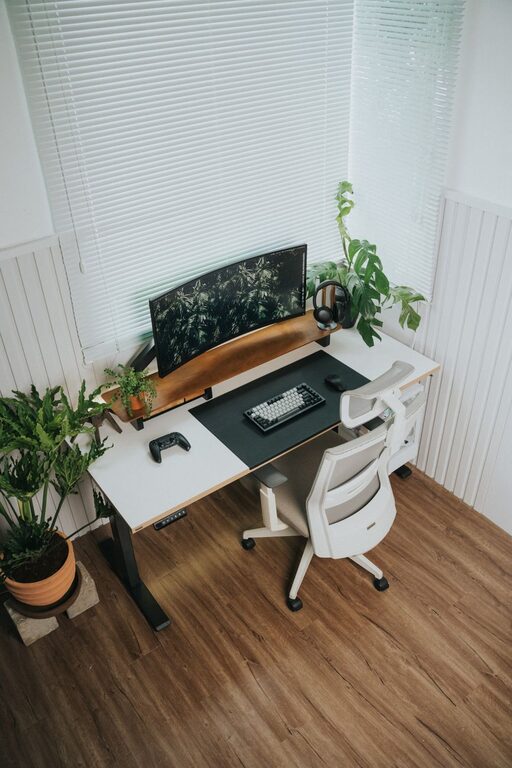
– Consider Natural Light: Position your desk near a window if possible. Natural light can boost mood and reduce eye strain.
– Check for Power Outlets: Ensure there are enough power outlets to support your devices without overloading extension cords.
2. Invest in Ergonomic Furniture
Comfort plays a key role in productivity. Ergonomic furniture supports your body and helps prevent discomfort during long work sessions.
– Chair: Choose an adjustable ergonomic chair with good lumbar support. Your feet should rest flat on the floor, and your knees should be at a 90-degree angle.
– Desk: Select a desk at a height that allows your arms to rest comfortably at your sides with elbows at roughly 90 degrees. Standing desks or adjustable desks are great options for alternating postures.
– Monitor Position: The top of your computer screen should be at or slightly below eye level, about an arm’s length away.
3. Organize Your Workspace Efficiently
An organized desk improves focus and minimizes distractions.
– Declutter Regularly: Keep only the essentials on your desk. Store other items in drawers or shelves.
– Use Storage Solutions: Bins, trays, and organizers can help keep papers, chargers, and supplies tidy.
– Cable Management: Use cable clips or sleeves to keep cords neat and out of the way.
4. Optimize Lighting
Proper lighting reduces eye strain and fatigue.
– Use a Combination of Lights: Natural light supplemented with task lighting works best. A desk lamp with adjustable brightness can be helpful.
– Avoid Glare: Position screens and lights to prevent reflection and glare, which can cause headaches or blur your vision.
– Choose the Right Bulbs: Soft white or daylight bulbs create a comfortable atmosphere without harshness.
5. Personalize Your Space
Personal touches can make your workspace inviting and motivate you to spend time there.
– Add Plants: Greenery not only brightens the room but can also improve air quality.
– Use Inspirational Items: Display photos, quotes, or artwork that inspire and uplift you.
– Choose Comfortable Textures: A cozy rug or cushions can make your space feel warmer.
6. Minimize Noise and Distractions
Creating a quiet environment helps maintain concentration.
– Noise-Canceling Headphones: These are great for blocking out background noise.
– White Noise or Background Music: Some people focus better with soft music or ambient sounds.
– Communicate Boundaries: If you live with others, clearly communicate your work hours to minimize interruptions.
7. Incorporate Break Spaces
Taking breaks is important for productivity and wellbeing.
– Designate a Spot for Breaks: Have a comfortable chair or small nook away from your desk for resting.
– Use Reminders: Set timers or alarms to encourage regular movement and eye rest.
– Stretch and Move: Incorporate short stretches or walks to reduce physical strain.
8. Use Technology Wisely
The right tech setup supports productivity without causing frustration.
– Reliable Internet: Ensure your connection is stable and fast enough for your work needs.
– Quality Equipment: Invest in a good keyboard, mouse, and headset to make your work comfortable.
– Software Tools: Utilize productivity apps that help manage tasks and reduce clutter.
9. Maintain Good Posture and Health Habits
Your body’s health is vital for sustained focus.
– Practice Proper Posture: Sit with your back straight, shoulders relaxed, and wrists neutral.
– Stay Hydrated: Keep a water bottle nearby.
– Schedule Eye Breaks: Follow the 20-20-20 rule—every 20 minutes, look at something 20 feet away for 20 seconds.
—
Setting up a home workspace that is both comfortable and productive doesn’t have to be complicated. By paying attention to location, furniture, organization, lighting, and personal comfort, you can create an environment that supports your best work. Remember, small adjustments over time can lead to significant improvements in how you feel and perform throughout your workday. Happy working!